Release Notes
Varigence is excited to release the 2026 version of the BimlFlex platform for data solution automation!
- This is a major release and we recommend testing in a non-production environment before upgrading your production environment.
- Please make sure databases and projects are backed up before upgrading.
- Please email support@bimlflex.com with any installation or upgrade issues.
-
When upgrading, it is recommended to upgrade the BimlCatalog database across all your environments to ensure compatibility.
-
We have consolidated the TableObject and TableConfigurations into a single object. If you have any
ExtensionPointsthat referenceTableObjectorTableConfigurations.you will need to follow these steps. Upgrade Migrations
Installation
BimlFlex 2026 is installed and upgraded through a single consolidated installer.
Build 26.1.116.0, release date: 03 Dec 2026
- BimlFlex Developer Setup (64-bit). This installer includes all BimlFlex components for 64-bit
- BimlFlex Developer Setup (32-bit). This installer includes all BimlFlex components for 32-bit
- BimlFlex Runtime Setup (64-bit). This installer includes the required runtime components for servers that will execute SSIS packages for 64-bit
- BimlFlex Runtime Setup (32-bit). This installer includes the required runtime components for servers that will execute SSIS packages for 32-bit
New Features
Microsoft Fabric Lakehouse Support
Introducing support for Microsoft Fabric Lakehouse, extending metadata-driven automation to the Fabric ecosystem. This provides capabilities similar to the Databricks and Snowflake integrations, enabling customers to design and generate Lakehouse solutions directly within the platform.
-
Metadata Import Support: Schema and object metadata can be imported directly from Fabric Lakehouse to drive automation patterns. This reduces manual mapping and accelerates the creation of Data Vault and Data Mart solutions based on existing Lakehouse structures.
-
Data Vault Templates: New templates generate hubs, links, satellites, and PIT/Bridge tables within Fabric Lakehouse. These accelerate Data Vault implementation on Fabric and ensure consistent, metadata-driven automation across the platform.
-
Data Mart Templates: Specialized templates for Fabric Lakehouse automate the creation of dimensional models and reporting structures. This provides optimized Data Mart solutions that align with Fabric’s analytics and performance capabilities.
-
Delete Detection Templates: Templates for identifying and processing deletions in source systems are now available within Fabric Lakehouse. These simplify data management, ensure data integrity, and reduce manual intervention in handling deletes.
Microsoft Fabric Warehouse Support
Extended support for metadata-driven automation to include Microsoft Fabric Warehouse, providing full support for structured, SQL-based analytics. This expands the existing Fabric coverage, enabling data warehouse patterns and automation alongside Lakehouse, Databricks, and Snowflake.
-
Metadata Import Support: Warehouse objects such as schemas, tables, and views can be imported directly from Microsoft Fabric Warehouse. This accelerates onboarding by eliminating manual mapping and allows existing structures to drive automation patterns.
-
Data Vault Templates: Templates have been introduced for implementing Data Vault modeling within Fabric Warehouse, including hubs, links, satellites, and PIT/Bridge tables. This ensures consistent automation across both Warehouse and other supported targets.
-
Data Mart Templates: Fabric Warehouse-specific templates support the generation of dimensional models, including star schemas and reporting tables. These templates are optimized for Fabric’s T-SQL–based query engine to deliver strong performance for analytics workloads.
-
Delete Detection Templates: Support for delete detection has been added to Fabric Warehouse, enabling automated handling of record removals in source data. This ensures warehouse tables remain synchronized and accurate without requiring manual intervention.
Microsoft Fabric Database Support
Support for Microsoft Fabric Database is introduced in preview. This functionality is limited, as many of the features required are still in preview on the Microsoft Fabric platform or have not yet been added.
Fabric Database support should be considered experimental at this stage. It is recommended for evaluation and testing purposes only, not for production workloads.
Databricks Enhancements
Introducing major new capabilities for Databricks, focused on performance optimization and expanded development options.
-
Pushdown Processing: A new option enables processing logic to be pushed directly into Databricks, eliminating the need for Azure Data Factory notebook activities. Instead, pipelines use the Azure Data Factory Databricks Job Activity, which significantly reduces cluster spin-up overhead and improves runtime performance.
With pushdown enabled, all transformations are executed within Databricks workflows or jobs, rather than being orchestrated externally. This approach lowers runtime costs, simplifies orchestration, and makes better use of serverless and lightweight cluster options. Early benchmarks demonstrated pipelines completing in under 30 minutes using serverless compute, compared to over two hours on larger dedicated clusters — representing up to a 75% reduction in runtime cost.
Pushdown processing supports staging, Data Vault, and Data Mart layers, with generated Databricks workflows handling dependencies, delta detection, and restart logic for resilient and incremental loads. All generated artifacts (pipelines, jobs, and notebooks) remain fully native to Databricks and Azure Data Factory, ensuring no proprietary runtime or execution engine is required.
-
SQL Scripting: A new configuration option enables native SQL-based scripting for Databricks workloads. Metadata-driven templates now support generating staging, Data Vault, and Data Mart patterns directly in SQL, providing greater readability and easier debugging. This option allows teams to align development practices with SQL-centric approaches while still leveraging Databricks’ scalability and performance.
Dynamics 365 Integration
Native support for Microsoft Dynamics 365 as a data source with flexible connectivity options:
- Linked Service Support: Added support for the Dynamics linked service, with options for both Dynamics CRM and Dynamics 365.
- Import Metadata: Excluded references to the systemuser entity. These references generated excessive and non-informative links that added noise without providing modeling value.
- Many-to-Many: Many-to-Many relationship logic now correctly uses the IntersectEntity, resolving issues with incorrect results and rogue records.
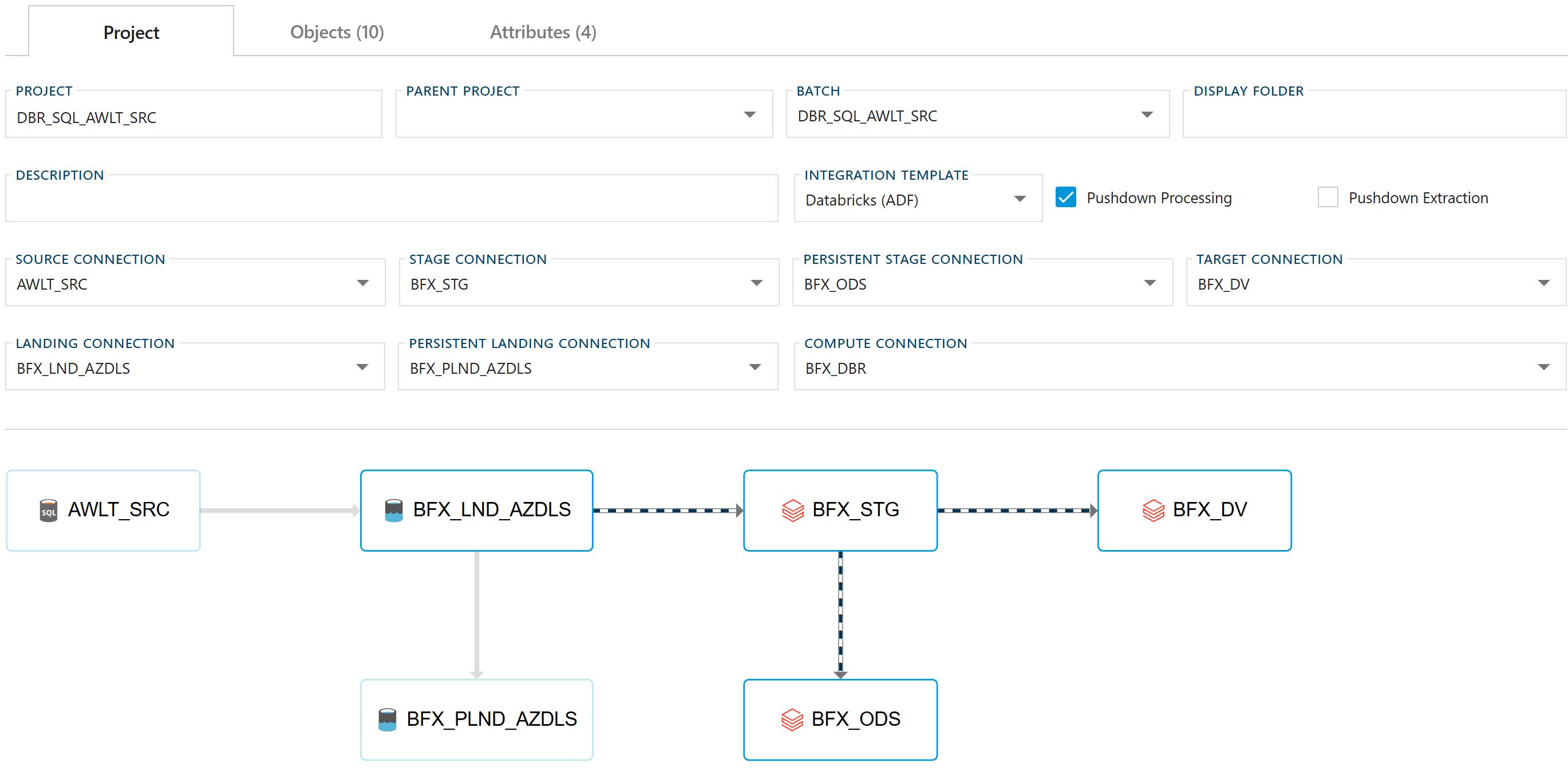
Project Screen Visualization
A new visualization has been added to the Project screen to provide a clearer view of data movement across integration layers. The diagram illustrates how data flows between landing, staging, Data Vault, and Data Mart layers, helping users better understand dependencies, track lineage, and validate architecture design. This enhancement improves transparency and makes it easier to communicate solution structure to both technical and business stakeholders.
Enhanced Business Modeling
Streamlined workflows for business attribute management and naming conventions:
- Automated Business Naming: One-click application of business naming conventions across objects and columns.
- Advanced Cloning: Enhanced metadata cloning with business name preservation and selective object handling.
- Improved Grid Management: Better column reordering capabilities and enhanced visual presentation of data grids.
- Save All Functionality: Comprehensive save operations across multiple form tabs with improved tracking of changes.
Enhancements and New Settings
Platform Support Enhancements
- Connection String Builder Improvements: Enhanced connection configuration with Microsoft Fabric support and improved visibility for connection parameters.
User Interface and Experience
- Unified Notification System: Comprehensive notification service with progress status reporting and detailed feedback dialogs.
- Consistent Dialog Framework: Improved dialog interactions with better handling of unsaved changes and enhanced navigation flows.
- Enhanced Validation: New validators including Databricks Views validation to prevent configuration errors and improve data quality.
- Documentation Viewer Enhancements: Improved in-product documentation access with better macro editing capabilities and enhanced code editing experience.
Data Processing and Integration
- Advanced Batch Processing: Improved error handling for batch operations with automatic cleanup of orphaned processes.
- Enhanced Execution Monitoring: Better visibility into data processing workflows with improved status tracking and troubleshooting capabilities.
- Configuration Management: More reliable configuration variable persistence and deployment consistency improvements.
Bug Fixes
Critical System Fixes
- User Settings Management: Fixed cascade delete issues to prevent orphaned records when managing user configurations.
- Project Switching Reliability: Resolved settings loss problems when changing between projects, ensuring configuration persistence.
- Business Attribute Saving: Fixed multiple issues ensuring business attributes save correctly and maintain data integrity.
- Archive Operations: Resolved JavaScript runtime errors during entity archiving operations improving system stability.
Grid and Data Management
- Column Grid Display: Fixed visual presentation issues and improved usability of data grids across multiple components.
- Metadata Import Filtering: Resolved filtering issues in import operations ensuring more reliable metadata import processes.
- Grid Width and Layout: Fixed display formatting issues providing better visual presentation and user experience.
Platform-Specific Improvements
- Databricks Processing: Fixed temporary views configuration and batch processing issues ensuring proper lifecycle management.
- Batch Objects Refresh: Resolved grid refresh issues ensuring newly created objects appear immediately after save operations.
- Execution Status Tracking: Fixed status reporting accuracy improving monitoring and troubleshooting capabilities.
Performance Improvements
Cloud Platform Optimization
- Databricks Integration: Enhanced orchestration capabilities for improved performance and cost efficiency in cloud data warehouse operations.
- Batch Processing: Optimized large-scale operation handling with better memory management and process efficiency.
- Query Generation: Improved SQL generation for complex scenarios reducing processing overhead.
Application Performance
- Change Tracking Updates: Updated application framework providing improved performance, faster load times, and better memory management.
- Save Operations: Enhanced save functionality with improved tracking across multiple form tabs and more responsive indicators.
- Code Generation: Optimized metadata operations including faster cloning and duplication processes.
Upgrade Considerations
Prerequisites
- BimlFlex 2026 requires .NET Framework 4.8
- SQL Server 2016+ for BimlCatalog deployment
Migration Steps
- Backup Current Environment: Ensure complete backup of existing BimlFlex databases and configurations
- Update BimlCatalog: Mandatory upgrade across all environments for compatibility
Support
For questions or issues related to BimlFlex 2026:
- Documentation: docs.varigence.com/bimlflex
- BimlFlex Support: support@bimlflex.com
For installation or upgrade assistance, please email support@bimlflex.com with detailed information about your environment and any issues encountered.