
Installing BimlExpress
BimlExpress is the free Biml authoring extension for Visual Studio Code from Varigence. The extension is listed on the Visual Studio Marketplace and on Open VSX by the publisher varigence-inc as BimlExpress, with the extension id varigence-inc.bimlexpress. Install it from the Extensions view of Visual Studio Code by searching for BimlExpress, or from either listing.
It requires:
- Visual Studio Code 1.96.0 or higher.
- The .NET 10 runtime. If it is missing, the extension shows guidance with a download link.
BimlExpress for Visual Studio Code describes the extension.
The earlier add-in for Visual Studio
The earlier BimlExpress add-in for Visual Studio is still offered as a download and is no longer developed. It can be downloaded here.
There are multiple methods of installation, all of which are detailed below.
Installing for Current User
After downloading the BimlExpress installation file, navigate to the location where the file was saved. Double-click on the installation file ending in ".vsix." A VSIX installation dialogue box will appear and prompt users to select which version(s) of Microsoft Visual Studio to install the BimlExpress extension to.
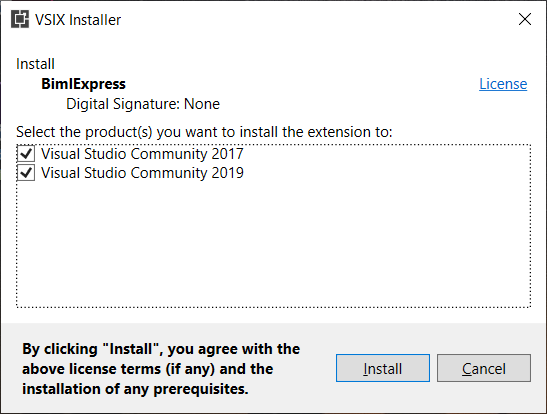
The installer package will run after selecting the desired Visual Studio versions and clicking "Install." A dialog box advising that installation was completed will appear after the process finishes.
If currently running, Visual Studio will need to be closed and restarted for any BimlExpress changes to take effect.
Installing from Command Line
Use vsixinstaller.exe.
Installing for All Users
Use vsixinstaller.exe with the /admin switch.