JDBC Driver and Serverless Job Clusters
Starting with BimlFlex 2026.1, Databricks notebooks can connect back to the BimlCatalog using a pure-Python JDBC / pytds driver instead of the Simba ODBC driver. Because JDBC requires no driver installation on the compute cluster, the Job Cluster setting can now be set to Serverless, unlocking Databricks serverless compute for BimlFlex-orchestrated workloads.
This page walks through the two configuration changes required to move a project onto serverless compute, explains what BimlFlex generates differently, and covers migration considerations.
Why this matters
| Benefit | Detail |
|---|---|
| Serverless compute | Serverless job clusters cannot run init scripts, so the ODBC driver cannot be installed at cluster start. JDBC removes that dependency entirely. |
| Faster cold starts | Serverless clusters typically start in seconds rather than minutes, removing the bulk of job-cluster spin-up overhead. |
| Lower total cost | Per-second serverless billing combined with pushdown processing further reduces runtime cost on top of the 50-75% savings already achievable with job clusters. |
| Simpler cluster policy | No custom init scripts to publish, maintain, or version-control. The generated Databricks Asset Bundle (DAB) references a bfx_jdbc environment with the required Python dependencies. |
| Same metadata, same pipelines | The switch is a settings change. No changes to source objects, business keys, Data Vault, or Data Mart metadata are required. |
Prerequisites
- BimlFlex 2026.1 or later (App and BimlStudio).
- A project configured for Databricks with Pushdown Processing enabled. See the Databricks ADF Pipeline Guide for the full project setup.
- A BimlCatalog database reachable from the Databricks workspace (Azure SQL Database is typical).
- The ability to store secrets in a Databricks secret scope (
bfx_setup_secrets.ps1is generated alongside the DAB output).
JDBC mode can be adopted independently of serverless: you can run JDBC on existing clusters or job clusters today, then flip the Job Cluster setting to Serverless once you are ready. This makes migration low risk.
Step 1: Set the Utils Driver to JDBC
In the BimlFlex App, open Settings → Databricks Options and change Utils Driver from ODBC to JDBC.

This setting drives the DatabricksUtilsDriver value. When set to JDBC, the generator will:
- Emit a
bfxutils.pythat uses the pure-Pythonpython-tds(pytds) library instead ofpyodbc. - Skip generation of the
bfx_init_odbc.shcluster init script: it is not needed. - Accept BimlCatalog credentials stored either as a traditional ODBC connection string or as a JSON object (
{"server": "host", "database": "db", "user": "u", "password": "p", "port": 1433}).bfxutils.pyparses both formats automatically. - For job-cluster (non-serverless) tasks, attach
python-tds,pyOpenSSL, andcertifias PyPI library dependencies on each task. - For serverless tasks, reference a shared
bfx_jdbcenvironment that carries those dependencies, and setdisable_auto_optimization: trueon each task.
Save your setting change. Changes take effect on the next build.
Step 2: Target serverless compute
With JDBC enabled you can now direct workloads to serverless compute. The target can be set globally for the project or overridden per object from the Databricks settings area.
Global setting
Set DatabricksJobCluster to one of:
| Value | Result |
|---|---|
| (empty) | Cluster assignment is not written. The deployer or Databricks workflow owner assigns the cluster. |
| A cluster name or cluster ID | The DAB emits existing_cluster_id referencing that cluster. |
Serverless | The DAB omits cluster assignment from task definitions and references the bfx_jdbc environment. Tasks run on serverless compute. |
Per-object overrides
Individual projects or batches can override the Job Cluster through the Overrides grid on the Databricks settings page. Each row pins a setting (here, Job Cluster) to a specific Project (or Batch/Object): for example, pinning DBR_SQL_AWLT_CT_SRC and DBR_SQL_AWLT_SRC to Serverless while the rest of the solution keeps using a job cluster.
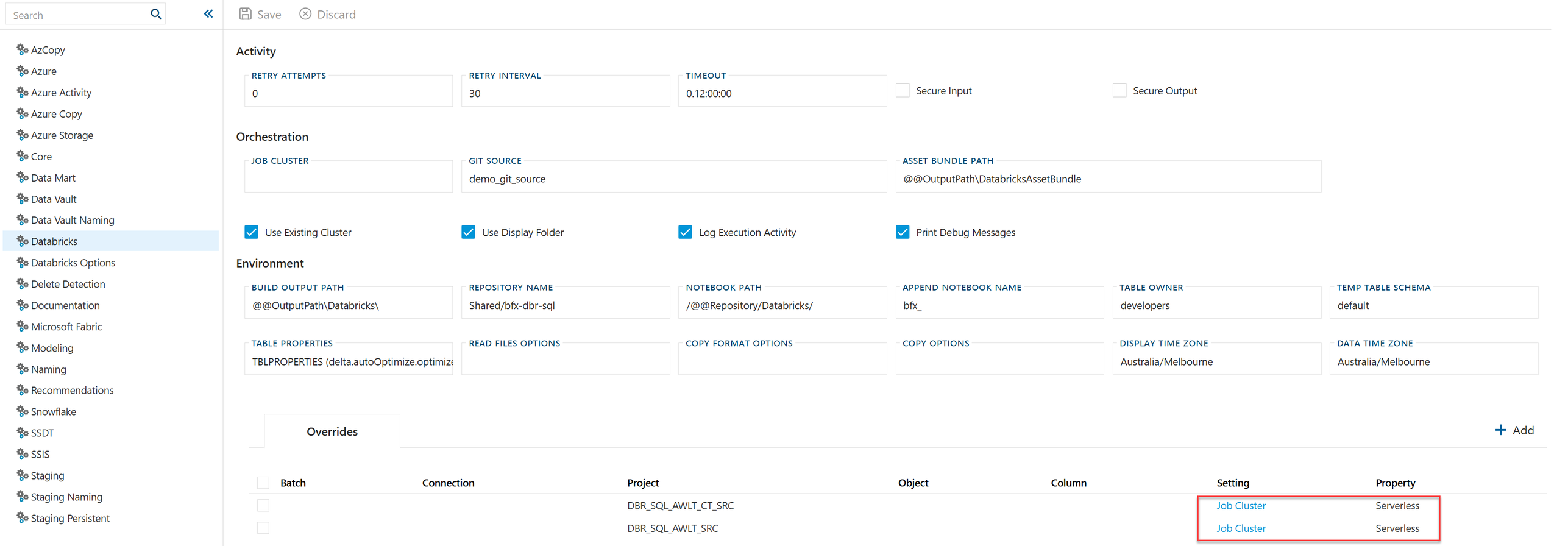
Overrides are the recommended pattern while piloting serverless. Pilot one or two extract or staging projects first, confirm cost and runtime behaviour, then flip the global DatabricksJobCluster setting to Serverless once you are confident.
What BimlFlex generates differently
Once you build the project, the output directory reflects the two settings:
| Artifact | ODBC mode | JDBC mode |
|---|---|---|
bfxutils.py | Uses pyodbc. Requires the Simba ODBC driver on the cluster. | Uses pytds. No driver installation required. |
bfx_init_odbc.sh | Generated. Must be attached to every cluster that runs BimlFlex notebooks. | Not generated. |
databricks.yml / resources/*.yml | Tasks carry job_cluster_key or existing_cluster_id. | Serverless tasks omit cluster assignment and reference the bfx_jdbc environment; non-serverless tasks attach PyPI libraries per task. |
bfx_setup_secrets.ps1 | Stores an ODBC connection string in the secret scope. | Stores either an ODBC connection string or a JSON credential object. |
See the ADF Pipeline Guide: Generated Artifacts for the full deployment sequence.
Migrating an existing project from ODBC to JDBC
- Upgrade to BimlFlex 2026.1 or later.
- Change
Utils DrivertoJDBCin Databricks Options. - Rebuild the project in BimlStudio.
- Redeploy the Databricks Asset Bundle and notebooks (
databricks bundle deploy). - Verify the secret scope contains BimlCatalog credentials. Either format (ODBC string or JSON object) works for the JDBC
bfxutils.py. - Remove the old
bfx_init_odbc.shinit script reference from your cluster policies once all workloads have moved to JDBC. - (Optional) Flip
DatabricksJobClustertoServerless(globally or via per-project overrides) to move workloads onto serverless compute.
Do not deploy ODBC-mode and JDBC-mode bfxutils.py into the same Databricks workspace path simultaneously. The file name is the same and the later deploy will overwrite the earlier. Plan your cutover so that all BimlFlex projects targeting the workspace use the same driver.
Considerations and limitations
- Serverless feature availability is governed by Databricks. Confirm your workspace region, Unity Catalog configuration, and workspace policy permit serverless job execution before cutting over.
- Network egress from serverless compute to the BimlCatalog SQL endpoint must be permitted. If your BimlCatalog is behind a private endpoint, ensure the serverless NCC (network connectivity configuration) is allowed to reach it.
- Custom init scripts are not supported on serverless. If your existing job clusters install anything beyond the ODBC driver via init scripts, evaluate whether those dependencies can be installed as task-level PyPI libraries instead.
- Pushdown Processing is required to benefit from serverless: the Databricks Job Activity is what runs on the job cluster. Projects using the traditional ADF Notebook Activity approach cannot target serverless through this setting.
Related reading
- Databricks ADF Pipeline Guide: end-to-end project setup.
- Implementing Databricks with Azure Data Factory: architecture overview and compute/connectivity options table.
DatabricksUtilsDriver: settings reference.DatabricksJobCluster: settings reference.- BimlFlex 2026.1 release notes: full list of Databricks enhancements in this release.