
Configuring an ADF Linked Service Connection for Netezza
For information on how to enable a connection for use with linked services, see Configuring a Linked Service Connection.
After selecting Netezza from the Linked Service Type dropdown, the form required for creating a Netezza Linked Service will appear.
The Netezza option is offered on connections that use the Netezza System Type.
BimlFlex authors the Netezza linked service at connector version 2.0.
Source Only Connector
A Netezza connection is used as a source. It is not available as a target.
A Netezza connection drives a Copy dataset from metadata, with the Schema and Table of the source object.
The dataset element is Netezza and the copy source is NetezzaSource.
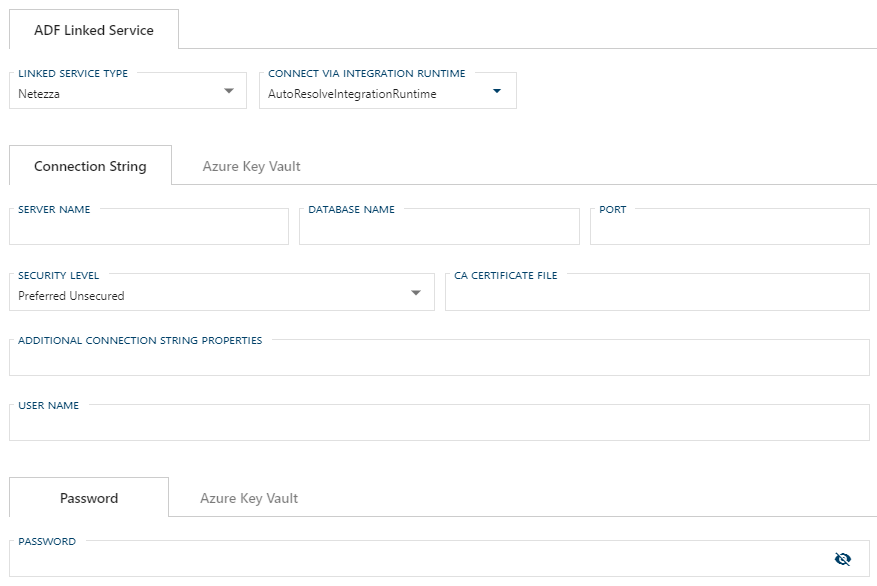
Required Fields
The required fields are:
- Connect via Integration Runtime
- Server Name
- Database Name
- Port
- Security Level
- CA Certificate File
- User Name
- Password
Optional fields are:
- Additional Connection String Properties
- The Azure Key Vault tab of the Connection String, in place of the User Name and Password fields
- The Azure Key Vault tab of the Password, in place of the password text
Connect via Integration Runtime
Connect via Integration Runtime names the integration runtime for a Netezza Linked Service connection.
The default value is AutoResolveIntegrationRuntime.
To use another runtime, select it from the dropdown or choose + New to add one.
The custom values that appear in this dropdown can be maintained in Settings under Azure, in the AzureIntegrationRuntime setting.
Azure Data Factory connects to Netezza at version 2.0 through a self-hosted integration runtime only. Install the IBM Netezza ODBC driver version 11.02.02 or higher on the machine that runs the self-hosted integration runtime.
Connection String
The Connection String tab of the form holds the Server Name, Database Name, Port, Security Level and CA Certificate File fields.
When the connection is saved, the form builds the connection string from the fields with the keys server, port, database, securitylevel, cacertfile, uid and pwd, and adds the Additional Connection String Properties.
A field left empty is not written to the connection string.
When the connection stores no linked service connection string and no Azure Key Vault secret for it, the form fills the fields from the connection string of the connection.
The Azure Key Vault tab beside the Connection String tab takes an Azure Key Vault secret that holds the whole connection string, named by the AKV Linked Service, the Secret Name and an optional Secret Version. BimlFlex writes the secret reference to the linked service when both the AKV Linked Service and the Secret Name are filled. While the Azure Key Vault tab is selected, the form hides the User Name, Password and Additional Connection String Properties fields. Once both the AKV Linked Service and the Secret Name are filled, a User Name or Password entered before the Azure Key Vault tab was selected is not written into the saved connection string. The linked service accepts exactly one of the connection string and the Azure Key Vault reference, so BimlFlex writes the connection string only when the Secret Name is empty, and otherwise writes the reference alone. A Secret Name with an empty AKV Linked Service names a secret in the BimlFlex Autogenerated KeyVault.
It is suggested that Azure Key Vault be used in place of manually entering Connection String details or Password.
Server Name
The Server Name is the host name or IP address of the Netezza server.
Server Name is required.
The form writes it to the connection string under the key server.
Database Name
The Database Name is the name of the Netezza database.
Database Name is required.
The form writes it to the connection string under the key database.
Port
The Port is the port number of the Netezza server listener.
Port is required, and the form fills in no default value.
The form writes it to the connection string under the key port.
Security Level
The Security Level sets the level of security that the driver uses for the connection to Netezza.
Security Level is required, and the default option is Preferred Unsecured.
The form writes the value of the selected option to the connection string under the key securitylevel:
| Option | Value |
|---|---|
Only Unsecured | onlyUnSecured |
Preferred Unsecured (Default) | preferredUnSecured |
Preferred Secured | preferredSecured |
Only Secured | onlySecured |
For more information, see the Microsoft documentation for Netezza Connector Linked Service Properties.
CA Certificate File
The CA Certificate File field takes the full path to the CA certificate file.
CA Certificate File is required for every Security Level.
The form writes it to the connection string under the key cacertfile.
User Name
The User Name is the user ID for the connection to the Netezza database.
User Name is required, except when the connection string comes from Azure Key Vault on the Azure Key Vault tab of the Connection String.
The form writes it to the connection string under the key uid.
Password
The Password field accepts the password as text on the Password tab, or an Azure Key Vault reference on the Azure Key Vault tab beside it that resolves to the password at runtime.
The form writes a password entered on the Password tab to the connection string under the key pwd.
The Azure Key Vault reference is named by the AKV Linked Service, the Secret Name and an optional Secret Version.
BimlFlex writes it as the pwd secret of the linked service when both the AKV Linked Service and the Secret Name are filled.
Fill in one of the two forms.
Password is required, except when the connection string comes from Azure Key Vault on the Azure Key Vault tab of the Connection String.
It is suggested that Azure Key Vault be used in place of manually entering the Password.
Additional Connection String Properties
Any additional properties entered here will be included in the Connection String.
These properties should be entered the same way you want them to appear in the connection string and separated by a semicolon, e.g. key=value;secondKey=secondValue.
Values entered in the Additional Connection String Properties textbox will be maintained when changing linked service types. If a required property from one service type does not have a corresponding text box in the newly selected linked service type, it will appear as an additional property.
Azure Data Factory Linked Services Additional Information
For additional information on ADF Linked Service types and their connection requirements see the Azure Data Factory Netezza Connector documentation.