Deploying BimlFlex Databases with Azure DevOps
This guide covers how to extract the BimlFlex and BimlCatalog DACPAC files from BimlStudio, commit them to source control, and deploy them to SQL Server using Azure DevOps pipelines.
Three deployment approaches are provided:
- Option A: Azure SQL - uses the native
SqlAzureDacpacDeploymenttask. Requires an Azure Resource Manager service connection. - Option B: SQL Server (on-premises or Azure SQL) - uses PowerShell with
SqlPackage.exe, which is pre-installed on Microsoft-hosted Windows agents. Works with any reachable SQL Server instance. - Option C: Manual deployment with SSMS - uses SQL Server Management Studio to run the pre-deployment scripts and deploy the DACPACs interactively. Suitable for environments where Azure DevOps pipelines are not available or for one-off deployments.
Prerequisites
- A BimlFlex project configured in BimlStudio
- An Azure DevOps project with a Git repository
- SQL Server target instances for the BimlFlex and BimlCatalog databases
- Appropriate permissions to create or alter databases on the target SQL Server
- Option A only: An Azure Resource Manager service connection configured in your Azure DevOps project
Step 1: Extract DACPACs from BimlStudio
- Open your BimlFlex project in BimlStudio
- Navigate to the BimlFlex ribbon tab
- Click the Debug Utilities button in the Administration group
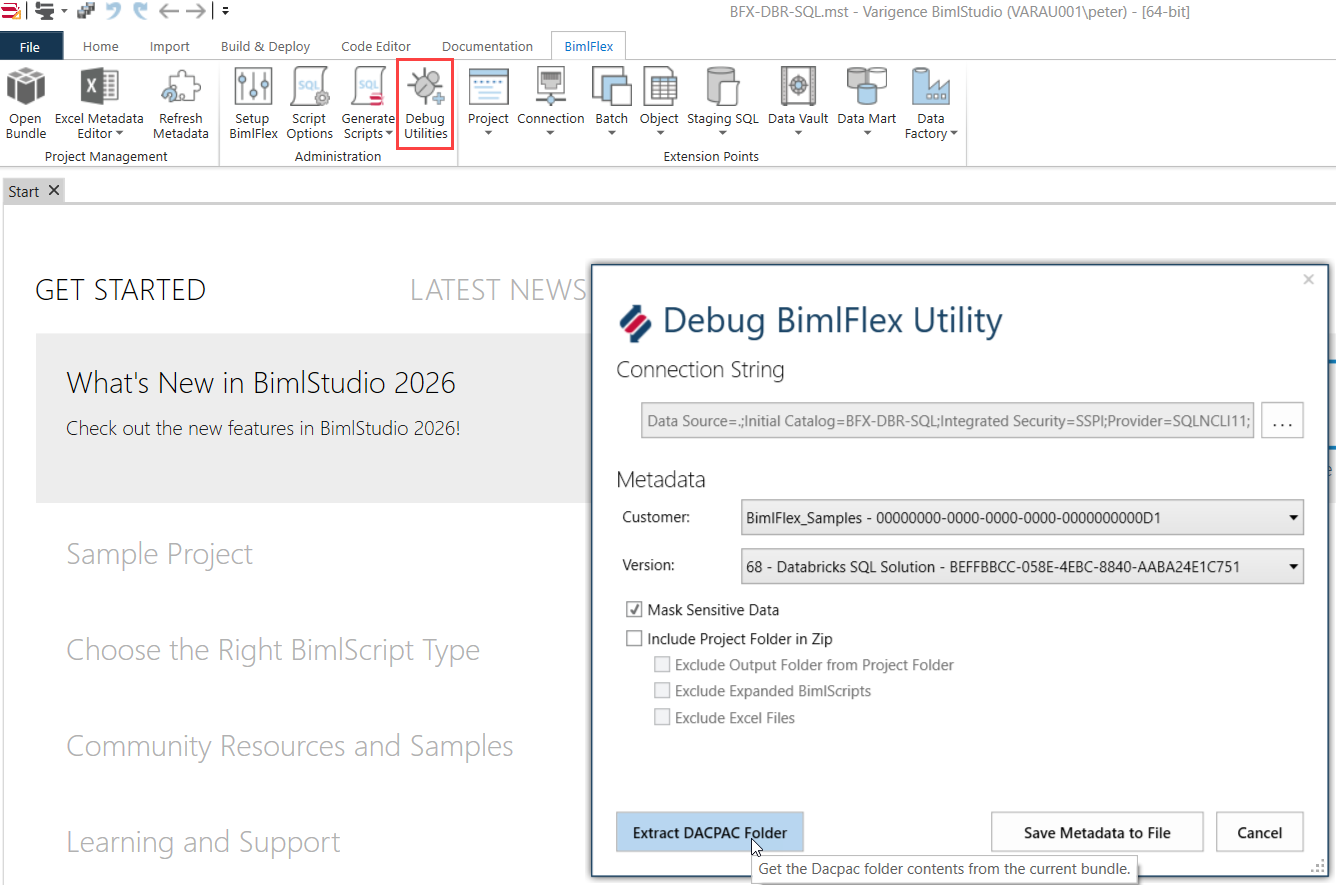
- In the Debug BimlFlex Utility dialog, click the Extract DACPAC Folder button
- Select a destination folder for the extracted files. The files will be extracted to a
Dacpacssubfolder within the selected location.
Step 2: Add DACPAC Files to Source Control
Navigate to the extracted folder. You will find the following files:
| File | Purpose |
|---|---|
BimlFlex.dacpac | Database schema definition for the BimlFlex metadata database |
BimlFlex_PreDacpac_Deployment.sql | Pre-deployment script that must run before upgrading an existing BimlFlex database |
BimlCatalog.dacpac | Database schema definition for the BimlCatalog orchestration database |
BimlCatalog_PreDacpac_Deployment.sql | Pre-deployment script that must run before upgrading an existing BimlCatalog database |
Copy these four files into your Azure DevOps Git repository. For this guide, we use the following folder structure:
/BimlFlex/Deploy/
    BimlFlex.dacpac
    BimlFlex_PreDacpac_Deployment.sql
    BimlCatalog.dacpac
    BimlCatalog_PreDacpac_Deployment.sql
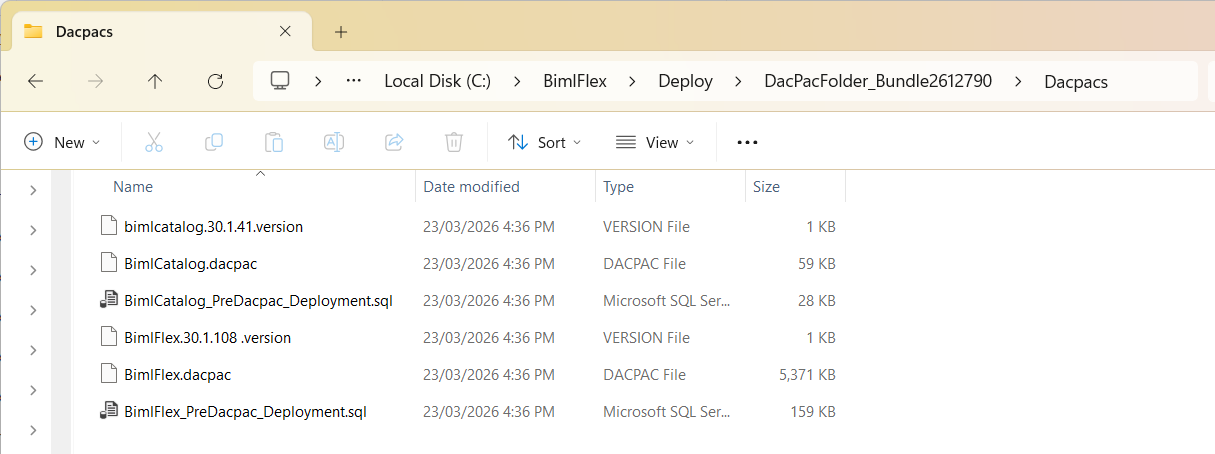
Commit and push the files to your repository.
Each time you upgrade BimlFlex to a new version, extract the updated DACPACs and pre-deployment scripts and commit them to your repository.
Step 3: Create the BimlFlex Database Pipeline
Create a new YAML pipeline file in your repository at /pipelines/deploy-bimlflex-db.yml.
This pipeline deploys the BimlFlex metadata database. It first checks whether the target database already exists and, if so, runs the pre-deployment script before deploying the DACPAC.
Option A: Azure SQL (Native Task)
This approach uses the built-in SqlAzureDacpacDeployment@1 task. It requires an Azure Resource Manager service connection and automatically manages Azure SQL firewall rules for the build agent.
trigger: none

parameters:
  - name: azureSubscription
    displayName: 'Azure Service Connection'
    type: string
  - name: sqlServerName
    displayName: 'SQL Server Name (e.g. myserver.database.windows.net)'
    type: string
  - name: databaseName
    displayName: 'Database Name'
    type: string
    default: 'BimlFlex'
  - name: sqlUsername
    displayName: 'SQL Username'
    type: string
  - name: sqlPassword
    displayName: 'SQL Password'
    type: string

pool:
  vmImage: 'windows-latest'

variables:
  dacpacPath: '$(Build.SourcesDirectory)/BimlFlex/Deploy/BimlFlex.dacpac'
  preDeployScriptPath: '$(Build.SourcesDirectory)/BimlFlex/Deploy/BimlFlex_PreDacpac_Deployment.sql'

steps:
  - task: SqlAzureDacpacDeployment@1
    displayName: 'Run BimlFlex Pre-Deployment Script (if database exists)'
    inputs:
      azureSubscription: '${{ parameters.azureSubscription }}'
      authenticationType: 'server'
      serverName: '${{ parameters.sqlServerName }}'
      databaseName: '${{ parameters.databaseName }}'
      sqlUsername: '${{ parameters.sqlUsername }}'
      sqlPassword: '${{ parameters.sqlPassword }}'
      deployType: 'SqlTask'
      sqlFile: '$(preDeployScriptPath)'
    continueOnError: true

  - task: SqlAzureDacpacDeployment@1
    displayName: 'Deploy BimlFlex DACPAC'
    inputs:
      azureSubscription: '${{ parameters.azureSubscription }}'
      authenticationType: 'server'
      serverName: '${{ parameters.sqlServerName }}'
      databaseName: '${{ parameters.databaseName }}'
      sqlUsername: '${{ parameters.sqlUsername }}'
      sqlPassword: '${{ parameters.sqlPassword }}'
      deployType: 'DacpacTask'
      deploymentAction: 'Publish'
      dacpacFile: '$(dacpacPath)'
      additionalArguments: '/p:AllowIncompatiblePlatform=True /p:BlockOnPossibleDataLoss=False'
The pre-deployment script step uses continueOnError: true so that the pipeline proceeds to DACPAC deployment even when the database does not yet exist and the script fails. On a fresh deployment the pre-deployment script is not needed.
Option B: SQL Server On-Premises or Azure SQL (PowerShell)
This approach uses PowerShell with SqlPackage.exe, which is pre-installed on Microsoft-hosted windows-latest agents. It works with any SQL Server instance reachable from the build agent and does not require an Azure service connection.
trigger: none

parameters:
  - name: sqlServerName
    displayName: 'SQL Server Name'
    type: string
  - name: databaseName
    displayName: 'Database Name'
    type: string
    default: 'BimlFlex'
  - name: sqlUsername
    displayName: 'SQL Username'
    type: string
  - name: sqlPassword
    displayName: 'SQL Password'
    type: string

pool:
  vmImage: 'windows-latest'

variables:
  dacpacPath: '$(Build.SourcesDirectory)/BimlFlex/Deploy/BimlFlex.dacpac'
  preDeployScriptPath: '$(Build.SourcesDirectory)/BimlFlex/Deploy/BimlFlex_PreDacpac_Deployment.sql'

steps:
  - task: PowerShell@2
    displayName: 'Run BimlFlex Pre-Deployment Script (if database exists)'
    inputs:
      targetType: 'inline'
      script: |
        $serverName = "${{ parameters.sqlServerName }}"
        $databaseName = "${{ parameters.databaseName }}"
        $username = "${{ parameters.sqlUsername }}"
        $password = "${{ parameters.sqlPassword }}"
        $scriptPath = "$(preDeployScriptPath)"

        # Check if the database exists
        $checkDbQuery = "SELECT COUNT(*) FROM sys.databases WHERE name = '$databaseName'"
        $result = Invoke-Sqlcmd -ServerInstance $serverName -Username $username -Password $password -Query $checkDbQuery -TrustServerCertificate

        if ($result.Column1 -eq 1) {
          Write-Host "Database '$databaseName' exists. Running pre-deployment script..."
          Invoke-Sqlcmd -ServerInstance $serverName -Database $databaseName -Username $username -Password $password -InputFile $scriptPath -TrustServerCertificate
          Write-Host "Pre-deployment script completed successfully."
        } else {
          Write-Host "Database '$databaseName' does not exist. Skipping pre-deployment script."
        }

  - task: PowerShell@2
    displayName: 'Deploy BimlFlex DACPAC'
    inputs:
      targetType: 'inline'
      script: |
        $serverName = "${{ parameters.sqlServerName }}"
        $databaseName = "${{ parameters.databaseName }}"
        $username = "${{ parameters.sqlUsername }}"
        $password = "${{ parameters.sqlPassword }}"
        $dacpacPath = "$(dacpacPath)"

        Write-Host "Deploying '$dacpacPath' to '$serverName/$databaseName'..."

        SqlPackage /Action:Publish `
          /SourceFile:"$dacpacPath" `
          /TargetServerName:"$serverName" `
          /TargetDatabaseName:"$databaseName" `
          /TargetUser:"$username" `
          /TargetPassword:"$password" `
          /TargetTrustServerCertificate:True `
          /p:AllowIncompatiblePlatform=True `
          /p:BlockOnPossibleDataLoss=False

        if ($LASTEXITCODE -ne 0) {
          Write-Error "DACPAC deployment failed with exit code $LASTEXITCODE"
          exit $LASTEXITCODE
        }

        Write-Host "BimlFlex database deployed successfully."
Step 4: Create the BimlCatalog Database Pipeline
Create a second pipeline file at /pipelines/deploy-bimlcatalog-db.yml.
This pipeline follows the same pattern for the BimlCatalog orchestration database.
Option A: Azure SQL (Native Task)
trigger: none

parameters:
  - name: azureSubscription
    displayName: 'Azure Service Connection'
    type: string
  - name: sqlServerName
    displayName: 'SQL Server Name (e.g. myserver.database.windows.net)'
    type: string
  - name: databaseName
    displayName: 'Database Name'
    type: string
    default: 'BimlCatalog'
  - name: sqlUsername
    displayName: 'SQL Username'
    type: string
  - name: sqlPassword
    displayName: 'SQL Password'
    type: string

pool:
  vmImage: 'windows-latest'

variables:
  dacpacPath: '$(Build.SourcesDirectory)/BimlFlex/Deploy/BimlCatalog.dacpac'
  preDeployScriptPath: '$(Build.SourcesDirectory)/BimlFlex/Deploy/BimlCatalog_PreDacpac_Deployment.sql'

steps:
  - task: SqlAzureDacpacDeployment@1
    displayName: 'Run BimlCatalog Pre-Deployment Script (if database exists)'
    inputs:
      azureSubscription: '${{ parameters.azureSubscription }}'
      authenticationType: 'server'
      serverName: '${{ parameters.sqlServerName }}'
      databaseName: '${{ parameters.databaseName }}'
      sqlUsername: '${{ parameters.sqlUsername }}'
      sqlPassword: '${{ parameters.sqlPassword }}'
      deployType: 'SqlTask'
      sqlFile: '$(preDeployScriptPath)'
    continueOnError: true

  - task: SqlAzureDacpacDeployment@1
    displayName: 'Deploy BimlCatalog DACPAC'
    inputs:
      azureSubscription: '${{ parameters.azureSubscription }}'
      authenticationType: 'server'
      serverName: '${{ parameters.sqlServerName }}'
      databaseName: '${{ parameters.databaseName }}'
      sqlUsername: '${{ parameters.sqlUsername }}'
      sqlPassword: '${{ parameters.sqlPassword }}'
      deployType: 'DacpacTask'
      deploymentAction: 'Publish'
      dacpacFile: '$(dacpacPath)'
      additionalArguments: '/p:AllowIncompatiblePlatform=True /p:BlockOnPossibleDataLoss=False'
Option B: SQL Server On-Premises or Azure SQL (PowerShell)
trigger: none

parameters:
  - name: sqlServerName
    displayName: 'SQL Server Name'
    type: string
  - name: databaseName
    displayName: 'Database Name'
    type: string
    default: 'BimlCatalog'
  - name: sqlUsername
    displayName: 'SQL Username'
    type: string
  - name: sqlPassword
    displayName: 'SQL Password'
    type: string

pool:
  vmImage: 'windows-latest'

variables:
  dacpacPath: '$(Build.SourcesDirectory)/BimlFlex/Deploy/BimlCatalog.dacpac'
  preDeployScriptPath: '$(Build.SourcesDirectory)/BimlFlex/Deploy/BimlCatalog_PreDacpac_Deployment.sql'

steps:
  - task: PowerShell@2
    displayName: 'Run BimlCatalog Pre-Deployment Script (if database exists)'
    inputs:
      targetType: 'inline'
      script: |
        $serverName = "${{ parameters.sqlServerName }}"
        $databaseName = "${{ parameters.databaseName }}"
        $username = "${{ parameters.sqlUsername }}"
        $password = "${{ parameters.sqlPassword }}"
        $scriptPath = "$(preDeployScriptPath)"

        # Check if the database exists
        $checkDbQuery = "SELECT COUNT(*) FROM sys.databases WHERE name = '$databaseName'"
        $result = Invoke-Sqlcmd -ServerInstance $serverName -Username $username -Password $password -Query $checkDbQuery -TrustServerCertificate

        if ($result.Column1 -eq 1) {
          Write-Host "Database '$databaseName' exists. Running pre-deployment script..."
          Invoke-Sqlcmd -ServerInstance $serverName -Database $databaseName -Username $username -Password $password -InputFile $scriptPath -TrustServerCertificate
          Write-Host "Pre-deployment script completed successfully."
        } else {
          Write-Host "Database '$databaseName' does not exist. Skipping pre-deployment script."
        }

  - task: PowerShell@2
    displayName: 'Deploy BimlCatalog DACPAC'
    inputs:
      targetType: 'inline'
      script: |
        $serverName = "${{ parameters.sqlServerName }}"
        $databaseName = "${{ parameters.databaseName }}"
        $username = "${{ parameters.sqlUsername }}"
        $password = "${{ parameters.sqlPassword }}"
        $dacpacPath = "$(dacpacPath)"

        Write-Host "Deploying '$dacpacPath' to '$serverName/$databaseName'..."

        SqlPackage /Action:Publish `
          /SourceFile:"$dacpacPath" `
          /TargetServerName:"$serverName" `
          /TargetDatabaseName:"$databaseName" `
          /TargetUser:"$username" `
          /TargetPassword:"$password" `
          /TargetTrustServerCertificate:True `
          /p:AllowIncompatiblePlatform=True `
          /p:BlockOnPossibleDataLoss=False

        if ($LASTEXITCODE -ne 0) {
          Write-Error "DACPAC deployment failed with exit code $LASTEXITCODE"
          exit $LASTEXITCODE
        }

        Write-Host "BimlCatalog database deployed successfully."
Step 5: Configure the Pipelines in Azure DevOps
- In your Azure DevOps project, navigate to Pipelines > New Pipeline
- Select Azure Repos Git and choose your repository
- Select Existing Azure Pipelines YAML file and browse to
/pipelines/deploy-bimlflex-db.yml - Save the pipeline with a descriptive name such as
Deploy BimlFlex Database - Repeat steps 1-4 for
/pipelines/deploy-bimlcatalog-db.yml, naming itDeploy BimlCatalog Database
Step 6: Run the Pipelines
- Navigate to the pipeline and click Run pipeline
- Fill in the required parameters:
- Azure Service Connection (Option A only) - the name of your Azure Resource Manager service connection
- SQL Server Name - the target server (e.g.,
myserver.database.windows.netormyserver\instancename) - Database Name - defaults to
BimlFlexorBimlCatalogbut can be overridden - SQL Username - a login with permission to create or alter the database
- SQL Password - the password for the SQL login
Back up existing databases before running the deployment pipeline. The pre-deployment script prepares the database for schema changes, but a backup provides a recovery path if anything goes wrong.
For production environments, consider storing the SQL credentials as pipeline secret variables or using an Azure Key Vault task rather than entering them as plain-text parameters.
Option C: Manual Deployment with SQL Server Management Studio (SSMS)
If Azure DevOps pipelines are not available, or you need to perform a one-off deployment, you can deploy the DACPACs manually using SQL Server Management Studio.
Prerequisites
- SQL Server Management Studio (SSMS) 18 or later installed
- The extracted DACPAC files and pre-deployment scripts from Step 1
- A SQL Server login with
db_ownerpermissions on the target databases (ordbcreatorserver role for new databases)
Deploy the BimlFlex Database
-
Open SQL Server Management Studio and connect to the target SQL Server instance using a server admin or sufficiently privileged login.
-
If the BimlFlex database already exists, run the pre-deployment script first:
- Open
BimlFlex_PreDacpac_Deployment.sqlin a new query window - Make sure the correct database is selected in the database dropdown (or add
USE [BimlFlex];at the top) - Execute the script
- Open
-
Deploy the DACPAC using the Upgrade Data-tier Application wizard:
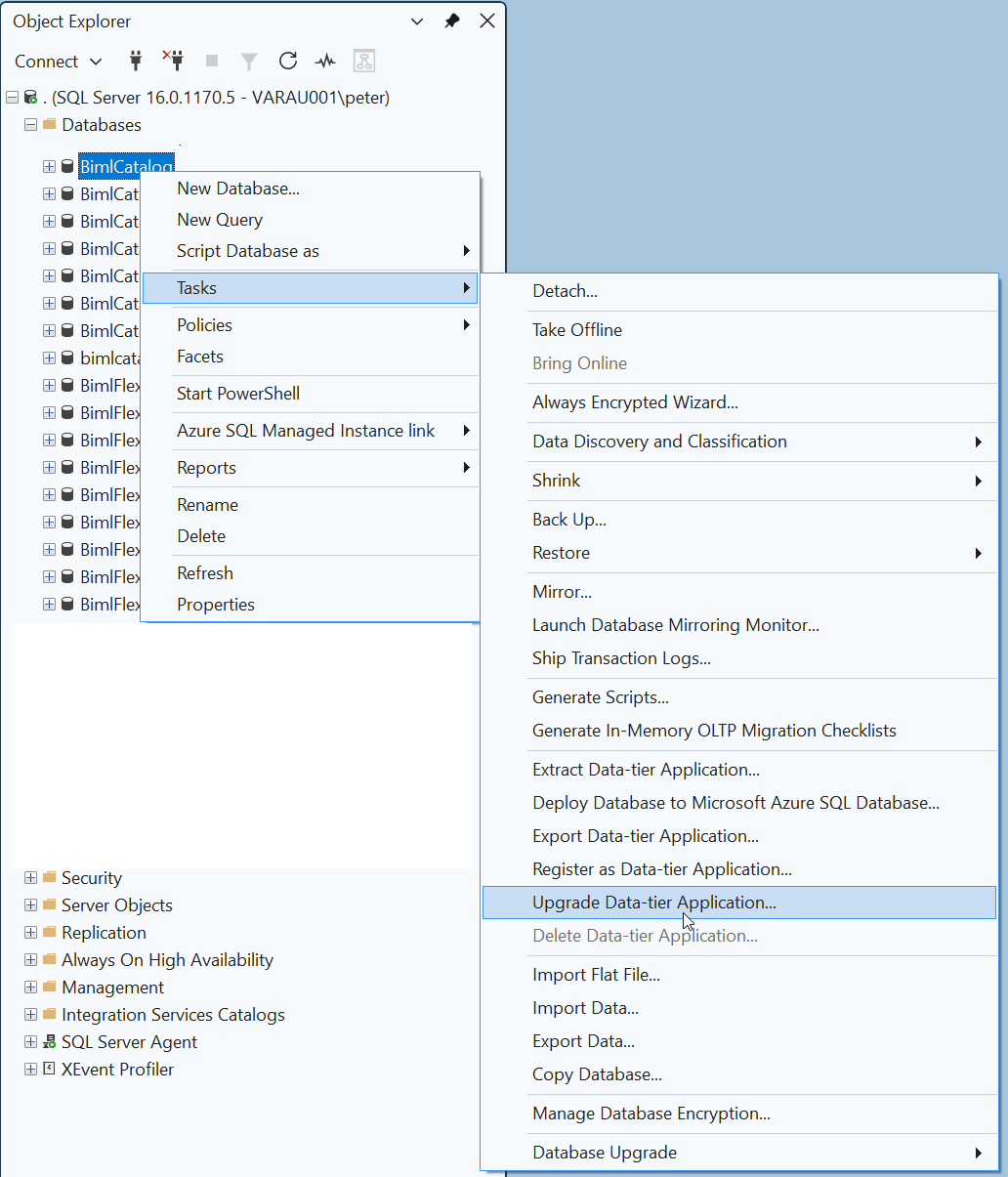
- In Object Explorer, expand Databases, right-click the BimlFlex database (or the server node if creating a new database), and select Tasks > Upgrade Data-tier Application...
- If deploying for the first time, right-click Databases and select Deploy Data-tier Application...
- Browse to
BimlFlex.dacpacand follow the wizard prompts - On the Summary page, review the changes and click Finish to begin the deployment
Deploy the BimlCatalog Database
- If the BimlCatalog database already exists, run the pre-deployment script:
- Open
BimlCatalog_PreDacpac_Deployment.sqlin a new query window - Make sure the correct database is selected in the database dropdown (or add
USE [BimlCatalog];at the top) - Execute the script
- Open
- Deploy the DACPAC using the Upgrade Data-tier Application wizard:
- In Object Explorer, expand Databases, right-click the BimlCatalog database and select Tasks > Upgrade Data-tier Application...
- If deploying for the first time, right-click Databases and select Deploy Data-tier Application...
- Browse to
BimlCatalog.dacpacand follow the wizard prompts - On the Summary page, review the changes and click Finish to begin the deployment
If you are deploying to a restored or backup copy of the databases, ensure that the bimlflex SQL Server user has the db_owner role on both the BimlFlex and BimlCatalog databases before running the upgrade.
Alternative: Deploy Using SqlPackage from the Command Line
If you prefer a command-line approach without Azure DevOps, you can run SqlPackage.exe directly. Install it via dotnet tool install -g microsoft.sqlpackage or download it from the Microsoft SqlPackage documentation.
BimlFlex database:
# Run the pre-deployment script (if the database already exists)
sqlcmd -S <ServerName> -d BimlFlex -U <Username> -P <Password> -i BimlFlex_PreDacpac_Deployment.sql

# Deploy the DACPAC
SqlPackage /Action:Publish ^
  /SourceFile:"BimlFlex.dacpac" ^
  /TargetServerName:"<ServerName>" ^
  /TargetDatabaseName:"BimlFlex" ^
  /TargetUser:"<Username>" ^
  /TargetPassword:"<Password>" ^
  /TargetTrustServerCertificate:True ^
  /p:AllowIncompatiblePlatform=True ^
  /p:BlockOnPossibleDataLoss=False
BimlCatalog database:
# Run the pre-deployment script (if the database already exists)
sqlcmd -S <ServerName> -d BimlCatalog -U <Username> -P <Password> -i BimlCatalog_PreDacpac_Deployment.sql

# Deploy the DACPAC
SqlPackage /Action:Publish ^
  /SourceFile:"BimlCatalog.dacpac" ^
  /TargetServerName:"<ServerName>" ^
  /TargetDatabaseName:"BimlCatalog" ^
  /TargetUser:"<Username>" ^
  /TargetPassword:"<Password>" ^
  /TargetTrustServerCertificate:True ^
  /p:AllowIncompatiblePlatform=True ^
  /p:BlockOnPossibleDataLoss=False
Deployment Order
When deploying both databases, deploy them in the following order:
- BimlFlex database first - this is the metadata repository
- BimlCatalog database second - this is the orchestration and auditing database
The BimlCatalog database does not depend on the BimlFlex database at the schema level, but deploying in this order ensures the metadata repository is ready before orchestration is configured.
Troubleshooting
Pre-Deployment Script Failures
The pre-deployment script is designed to run against an existing database. If it fails:
- Verify the SQL credentials have sufficient permissions (
db_owneron the target database) - Check the pipeline logs for the specific SQL error message
- Ensure the pre-deployment script version matches the DACPAC version (both should be extracted together)
SqlPackage Not Found (Option B)
SqlPackage.exe is pre-installed on Microsoft-hosted windows-latest agents. If you are using a self-hosted agent and the command is not found, add a step to install it before the deployment steps:
  - task: DotNetCoreCLI@2
    displayName: 'Install SqlPackage'
    inputs:
      command: 'custom'
      custom: 'tool'
      arguments: 'install -g microsoft.sqlpackage'
AllowIncompatiblePlatform
All deployment commands include /p:AllowIncompatiblePlatform=True. This flag is required when the DACPAC was built against a different SQL Server version or platform than the target (for example, deploying a DACPAC built for SQL Server to Azure SQL Database, or vice versa). Without this flag, SqlPackage may refuse to deploy with a platform compatibility error.
BlockOnPossibleDataLoss
All deployment commands include /p:BlockOnPossibleDataLoss=False to allow schema changes that may result in data loss (such as column type changes). If you prefer a safer deployment, change this to True and manually review any breaking changes before re-running.