
Batch Orchestration
Data can be loaded in the the data solution using different scheduling approaches. For example, data can be loaded and processed in batches that run daily or multiple times each day - or data can be loaded in a continuous fashion. In all cases, the BimlFlex templates cater for the orchestration of this so that data is processed in the right order.
BimlFlex includes an Orchestration engine that controls failure scenario management, auditing and logging of runs. All Orchestration data is stored in the BimlCatalog database.
Batch Orchestration is controlled per Batch with the Use Orchestration option of the Batch Editor in the BimlFlex App.
Legend
| Key | Description |
|---|---|
 | The red dot indicates a placeholder for extensions. |
 | The blue dashed line box with diagonal grey lines depicts "Overrides" derived from metadata as per the following example. |
 | The blue dashed line box without diagonal grey lines specifies "Overrides" derived from an ExtensionPoint defined within the BimlStudio project. |
 | The orange dashed line box with diagonal grey lines depicts a sub-process that is described in a separate diagram as per the following example. |
 | The red dashed line box depicts a control flow ExtensionPoint that is either injected in the relevant position or in some cases overrides the original BimlFlex process. |
Orchestration
The following diagram illustrates the package control flow.
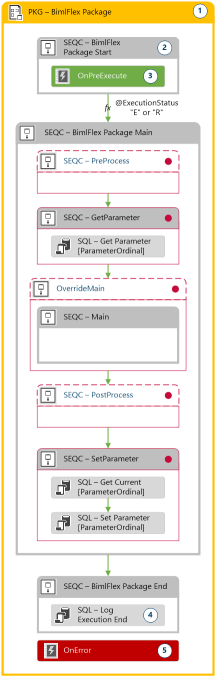
The Orchestration Framework enables packages to maintain process and data integrity in case of an error condition. If a Package or Batch fail the Orchestration manages what runs in the next sequence and can, optionally, handle rollback of inconsistent data.
The Orchestration Framework includes audit and performance logging.
Package Segments
Every package is broken up into the following three main segments
SEQC - BimlFlex Package Start
The start sequence container holds the OnPreExecute event handler that controls the Orchestration path. The diagram below illustrates the event handler logic.
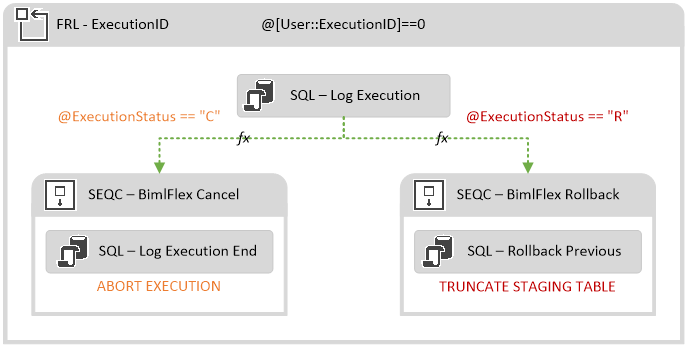
The following Stored Procedure is executed by the Start Event
EXEC [ssis].[LogExecution]
    @ExecutionGUID,
    @SourceGUID,
    @PackageName,
    @IsBatch,
    @ParentSourceGUID,
    @ParentExecutionID,
    @ServerExecutionID,
    @ExecutionID,
    @ExecutionStatus,
    @NextLoadStatus,
    @LastExecutionID,
    @BatchStartTime
SEQC - BimlFlex Package Main
Package Main is where all the template specific logic is implemented.
SEQC - BimlFlex Package End
Log successful execution of the package and set the next run status to 'P' for process. The following Stored Procedure is executed by the End Event
EXEC [ssis].[LogExecutionEnd] @ExecutionID, @IsBatch
Package Level Logging
Error Event Handler
Every package, including batches, has an OnError event handler configured. This is illustrated above as number 5 [OnError]
The Event Handler executes a stored procedure in the BimlCatalog database that logs the error
EXECUTE [ssis].[LogExecutionError]
   @ExecutionID
  ,@IsBatch
  ,@ErrorCode
  ,@ErrorDescription
The orchestration passes the ExecutionID, a Boolean, that identifies if the package is a batch or a child package as well as the error code and description.
Execution Status
Two main status flags determine the process flow, ExecutionStatus and NextLoadStatus:
Execution Status Legend
| Code | Description |
|---|---|
| E | Executing. Only one instance of the package can be running. If another instance is started, it will be aborted by [OnPreExecute]. |
| A | Aborted. If the package is executed while already running, it gets aborted by [OnPreExecute] and set the status to 'A'. |
| F | Failure. If there is a failure in the package or child packages, the [OnError] Event Handler is invoked and the status is set to 'F'. |
Next Load Status Legend
| Code | Description |
|---|---|
| P | Process: The next time the package is executed it may start normally.  |
| C | Cancel/Abort: The next time the package is executed it should be aborted or skipped. |
| R | Rollback: The next time the package is executed it should invoke the Rollback process if defined and execute.  |
Start logic
Logs the start of execution. Checks the results of the previous execution before proceeding.
Rollback logic
Data and process integrity rollback for failed loads.
End logging
Logging successfully completion.
Error logging
Logs error condition and status as well as error code and description.
Scenarios
Orchestration behavior at individual package level and batch level
Package Level Success
If a single package makes it through the "SEQC - BimlFlex Package Main" container, the final container called "SEQC - BimlFlex Package End" will be invoked, this, in turn, executes the Execute SQL task "SQL - Log Execution End"
Where the logged execution id matches that of the successful package the ExecutionStatus will be set to S for success and the NextLoadStatus (the status that controls the actions of the next execution) is set to P for process.
This means that the package is ready for a normal run on the following execution and doesn't need to perform a rollback.
Batch Level Success
If all of the child packages in this batch successfully execute the result is similar to the success of an individual child package. After the main package sequence container, "SEQC - BimlFlex Package End" will be invoked, this, in turn, executes the Execute SQL task "SQL - Log Execution End", setting the S and P for the ExecutionStatus and NextLoadStatus
Package Level Failure
If a single package fails in the "SEQC - BimlFlex Package Main" container, meaning an error occurs, the OnError event handler will execute the execute SQL task called "SQL - Log Execution Error"
When the package is restarted the OnPreExecute event in the starting sequence container "SEQC - BimlFlex Package Start" will handle Orchestration. If rollback is enabled, the data from the previously failed execution of the package will be managed depending on what integration stage the package is used in.
Batch Level Failure
Batch level failures manages Orchestration and rollback for entire load across all packages in the batch.
Batch package failures trigger the OnError event handler that run the execute SQL task "SQL - Log Execution Error". This time the parameter @IsBatch will be true. Within [ssis].[LogExecutionError] there will be a conditional check made on @IsBatch, where if it is true we will update the execution table to make the NextLoadStatus to be R for all packages of the same ExecutionID, prompting all packages in that batch to rollback on their next execution.
Any configuration values associated with the failed ExecutionID are reverted to their previous values.
Regular statements for updating the ExecutionStatus and NextLoadStatus in [ssis].[Execution] to F and R respectively and adding a row to the [ssis].[ExecutionError] table.
Rollback
Rollback will remove partially loaded rows from the target tables. Depending on what integration stage the package are used in will determine what kind of roll back technique will be used.
- If the integration stage is Source the target table will be truncated.
- If the integration stage is Data Vault and Enable Rollback is on, the ExecuteSQL task
SQL - Get Rollback Executionsfirst reads from the BimlCatalog the executions of the package that started after its last successful execution, the 150 latest at most. Then an ExecuteSQL task namedSQL - Rollback Previous Executionand the table name runs aDELETEon each Data Vault table that the package maps, and also on each hub that its links and satellites reference when Infer Link Hub is on, for the rows whose row audit id is one of those executions. Rows that other packages wrote to the same table stay, and a table without a row audit id column gets noDELETE. A package that has not yet completed a run deletes nothing. - If the integration stage is Source, the data is being persisted in a PSA environment and Rollback PSA is on, the ExecuteSQL task
SQL - Rollback PSA Previous Executionruns aDELETEon the persistent staging table, also when it shares a database with staging, for the rows whose row audit id is greater than the last successful execution of the package. - If the integration stage is Data Vault, Enable Rollback is on and End Date Satellite is on, an ExecuteSQL task named
SQL - Rollback Previous Execution Reopenand the table name runs before the deletes for each satellite, link satellite and reference table that gets aDELETE. It sets theRowEffectiveToDateto9999-12-31and theRowIsCurrentto1on each row whoseRowEffectiveToDateis theRowEffectiveFromDateof a row of the same key that one of those executions wrote, so a row that the failed run end dated is current again. - If the integration stage is in the data warehouse or data mart, the regular loading of data via hashed rows will detect the data that needs to be updated and will be synced as normal operation.
Sample Execution Error workflow
The following illustrates the Orchestration of a main load sequence

An error condition in the second run will generate the following Status Flag updates for the run.
First Execution (Successful)
| Process | Task | Execution Status | Next Execution |
|---|---|---|---|
| Start | PKG -> Batch | E | C |
| Start | PKG -> DIM Address | E | C |
| Success | PKG -> DIM Address | S | P |
| Start | PKG -> DIM Customer | E | C |
| Success | PKG -> DIM Customer | S | P |
| Start | PKG -> FACT Sales | E | C |
| Success | PKG -> FACT Sales | S | P |
| Success | PKG -> Batch | S | P |
Second Execution (Failure)
| Process | Task | Execution Status | Next Execution |
|---|---|---|---|
| Start | PKG -> Batch | E | C |
| Start | PKG -> DIM Address | E | C |
| Success | PKG -> DIM Address | S | P |
| Start | PKG -> DIM Customer | E | C |
| Failure | PKG -> DIM Customer | F | R |
| Skipped | PKG -> FACT Sales | S | P |
| Failure | PKG -> Batch | F | R |
| Success | PKG -> DIM Address | S | C |
In the above scenario, when the Batch is executed again, it will skip DIM Address and Rollback DIM Customer if the rollback process has been enabled.
Rollback configuration
BimlFlex supports rollback for terminated or failed loads.
Process management for failed loads and data integrity checks is an architecture and process decision.
The rollback function is controlled per layer in the Configurations and all are disabled by default.
| ConfigurationKey | ConfigurationValue |
|---|---|
| EnableRollbackStg | N |
| EnableRollbackPsa | N |
| EnableRollbackDv | N |